Kubernetes, also known as K8s, is an open-source system for automating deployment, scaling, and management of containerized applications.
It groups containers that make up an application into logical units for easy management and discovery. Kubernetes builds upon 15 years of experience of running production workloads at Google, combined with best-of-breed ideas and practices from the community.

What can you do with Kubernetes?
API and Backend Services
Use Kubernetes to deploy, scale, and manage the services that power your applications. From authentication to message queues to custom app logic, deploying to Kubernetes provides portability, availability, and efficiency for your services.
Web Apps
Deploy your web applications to Kubernetes for easier scaling, higher availability, and lower costs. Kubernetes also makes it easier to release new versions seamlessly.
CI/CD
Run GitLab core components on Kubernetes to manage your development lifecycle, or just the Gitlab Runners to easily scale your build and integration pipeline.
Configuring Kubernetes involves setting up the cluster, configuring networking, and preparing the environment for deploying your applications. Below are the general steps for configuring Kubernetes:
1. Setting Up a Kubernetes Cluster:
- Choose a Kubernetes Distribution:
- Decide whether you want to use a managed Kubernetes service (e.g., Google Kubernetes Engine, Amazon EKS, Azure Kubernetes Service) or set up your cluster on your infrastructure using tools like kubeadm, kops, or Rancher.
- Install and Configure Kubectl:
- Install
kubectl, the Kubernetes command-line tool, on your local machine. This tool is used to interact with your Kubernetes cluster.
- Install
# Download the latest release and validate the binary

curl -LO "https://dl.k8s.io/release/$(curl -L -s https://dl.k8s.io/release/stable.txt)/bin/linux/amd64/kubectl"
curl -LO "https://dl.k8s.io/release/$(curl -L -s https://dl.k8s.io/release/stable.txt)/bin/linux/amd64/kubectl.sha256"
echo "$(cat kubectl.sha256)  kubectl" | sha256sum --check

# If valid, the output is: kubectl: OK

# Install kubectl

sudo install -o root -g root -m 0755 kubectl /usr/local/bin/kubectl

# Test to ensure the version you installed is up-to-date

kubectl version --client
2. Cluster Networking:
- Choose a Network Plugin:
3. Node Configuration:
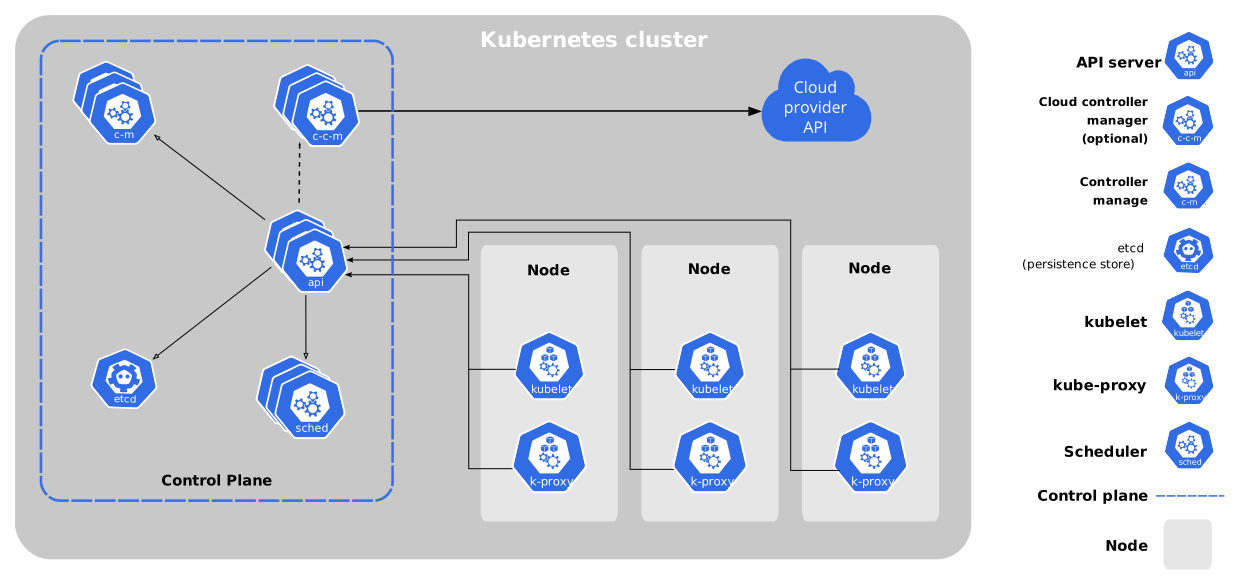
- Prepare Worker Nodes:
- Ensure that each node in your cluster meets the Kubernetes system requirements. Install Docker or another container runtime on each node.
- Join Nodes to the Cluster:
- Use the appropriate method (e.g., kubeadm for manual setup, cloud provider tools for managed services) to join worker nodes to the cluster.
4. Resource Management:
- Configure Resource Limits:
- Define resource limits for your cluster nodes to ensure fair resource distribution among pods.
5. Persistent Storage:
- Choose a Storage Solution:
- Determine how your applications will manage storage. Kubernetes supports various storage solutions, including local storage, network-attached storage (NAS), and storage area network (SAN).
6. RBAC (Role-Based Access Control):

- Define RBAC Policies:
- Configure RBAC to control access to the Kubernetes API. Define roles, role bindings, and service accounts for different components and users.
7. Ingress Controller:

- Set Up Ingress:
- If you need to expose your applications to the external world, set up an Ingress controller. Nginx Ingress, Traefik, and HAProxy are common choices.
8. Monitoring and Logging:

- Configure Monitoring:
- Implement monitoring solutions like Prometheus and Grafana to observe the health and performance of your cluster.
- Set Up Logging:
- Use tools like Elasticsearch, Fluentd, and Kibana (EFK) or the ELK stack for logging.
9. Secrets and Configurations:
- Manage Secrets:
- Use Kubernetes Secrets to manage sensitive information like API keys, passwords, and tokens.
- ConfigMaps:
- Use ConfigMaps to store configuration data separately from your application code.
10. Deploying Applications:
- Define Kubernetes Deployments:
- Write deployment configurations (YAML files) for your applications. Specify details like container images, replicas, and resource requirements. A Kubernetes Deployment YAML file is a configuration file written in YAML (YAML Ain’t Markup Language) that defines the desired state of a Kubernetes Deployment.
- Apply Deployments:
- Use
kubectl apply -fto deploy your applications to the cluster.
- Use
Example deployment.yaml:
apiVersion: apps/v1
kind: Deployment
metadata:
  name: your-app-deployment
spec:
  replicas: 3
  selector:
    matchLabels:
      app: your-app
  template:
    metadata:
      labels:
        app: your-app
    spec:
      containers:
      - name: your-app
        image: your-image-name:tag
kubectl apply -f deployment.yaml11. Scaling and Updates:
- Scaling Applications:
- Utilize Kubernetes features for scaling applications horizontally or vertically based on demand. Horizontal scaling means that the response to increased load is to deploy more Pods. This is different from vertical scaling, which for Kubernetes would mean assigning more resources (for example: memory or CPU) to the Pods that are already running for the workload.
- Rolling Updates:
- Implement rolling updates to deploy new versions of your applications without downtime.
12. Backup and Disaster Recovery:
- Implement Backup Strategies:
- Define backup strategies for your applications and persistent data.
- Plan for Disaster Recovery:
- Have a plan for recovering from unexpected failures.
Remember that these are general guidelines, and the specific steps might vary based on your cluster environment, infrastructure, and application requirements. Always refer to the official documentation of Kubernetes and the tools you are using for the most accurate and up-to-date information.
 Save as PDF
Acerca del autor